The Ultimate Modern Client.
Redis, Visualized as Redis.
JSON, Queues, Streams... Redis is not a SQL table. Why force it into one?
Ditch the legacy grid view and experience your data exactly as it was designed.
Everything you need.
Nothing you don't.
Built for developers who work with Redis every day. Fast, focused, and designed for real workflows.
Context-Aware Pattern Monitor
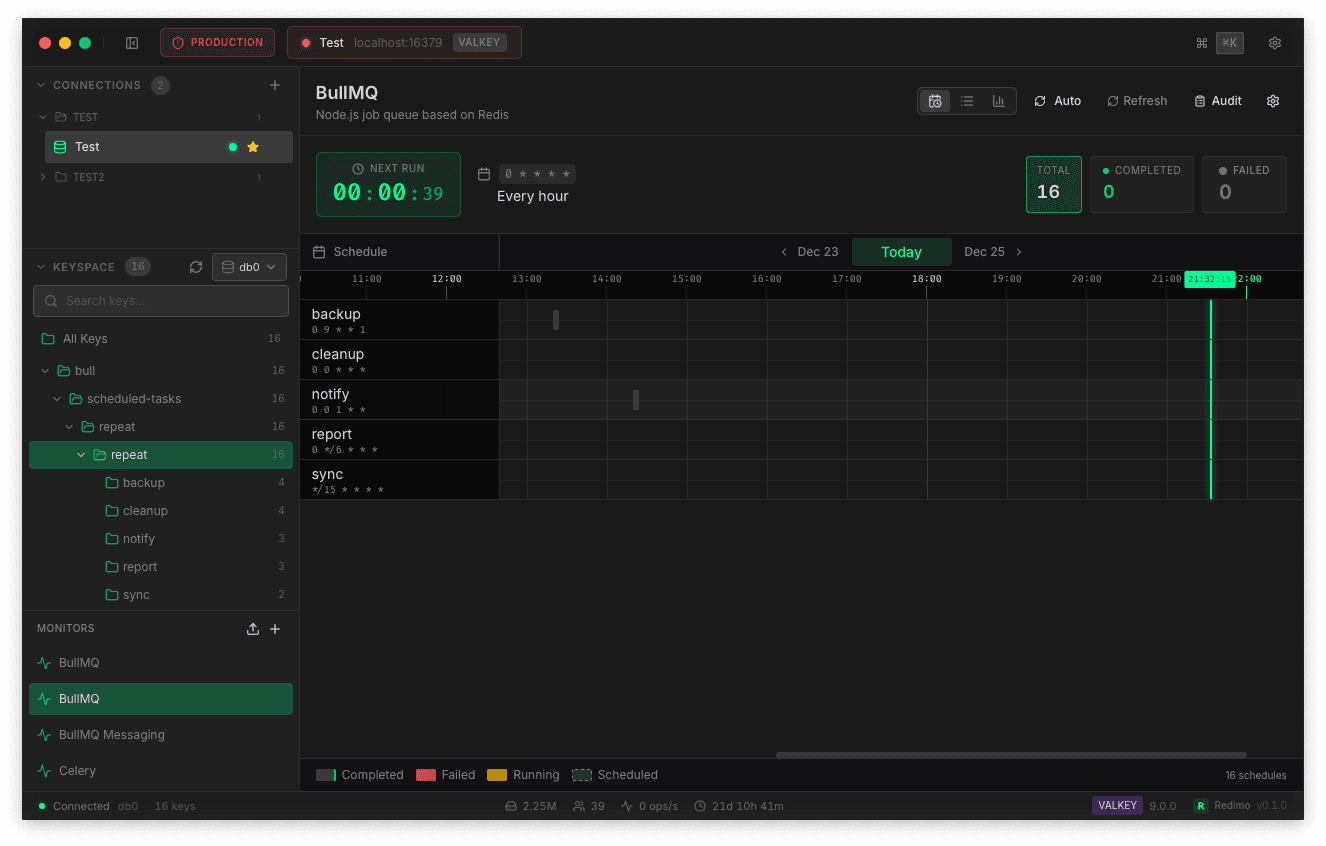
Stop digging through raw keys to debug your queues. Define patterns for BullMQ, Celery, or your custom implementation—Redimo renders the right interface automatically. Flow boards for queues, timelines for schedulers, live feeds for messaging.
- Built-in presets for BullMQ, Celery, Sidekiq
- Custom pattern matching with JSONPath mapping
- One-click Retry, Delete, and Move actions
- Real-time status updates without polling
See Beyond the String
Still copying values to format JSON elsewhere? Redimo auto-detects your data and renders the best viewer—syntax-highlighted JSON trees, hex views for binaries, or decompressed Gzip content.
- Smart JSON Editor with inline editing
- Auto-decompress Gzip, Snappy, BrotliSoon
- Binary & image preview supportSoon
- Bulk operations with instant Undo
Keyboard-First Workflow
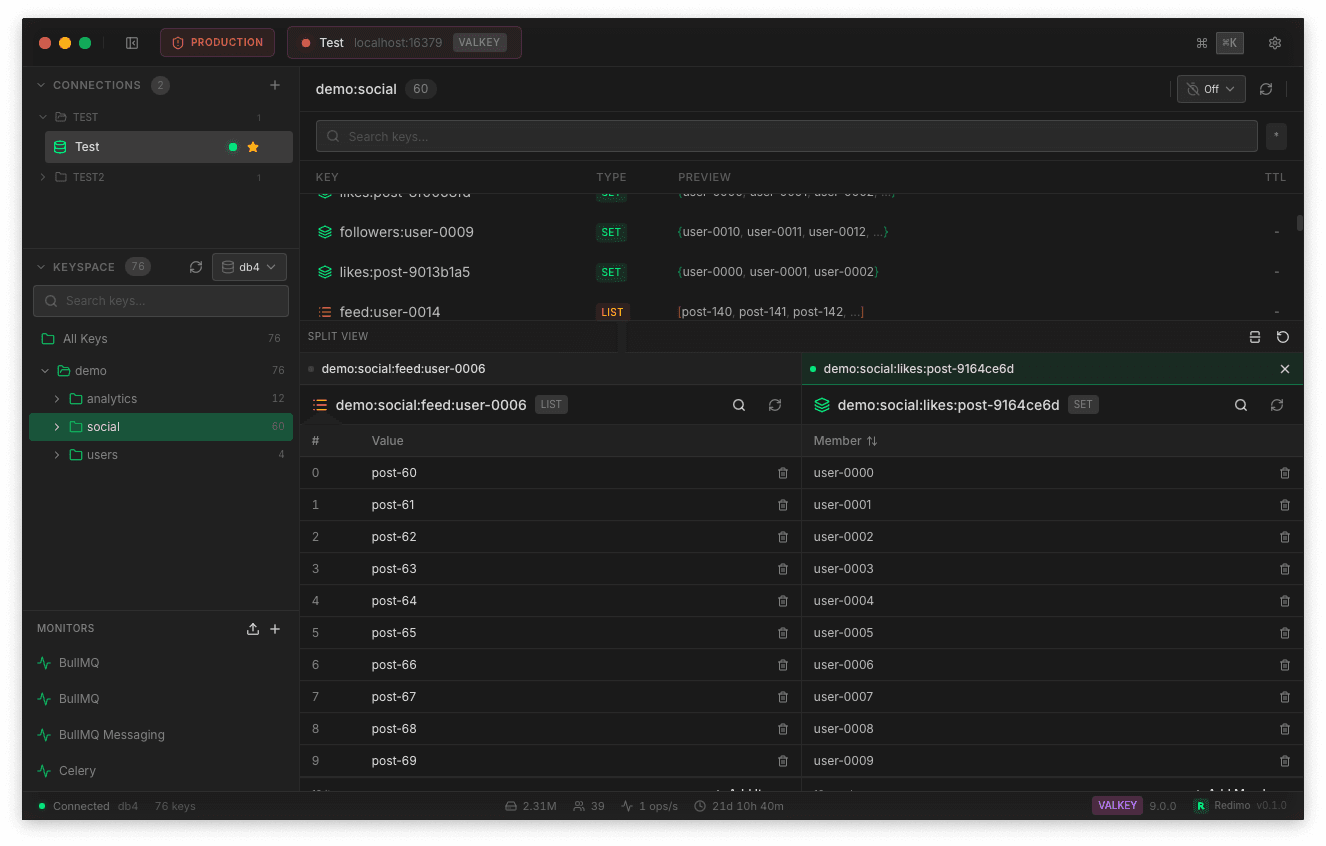
Keep your hands on the keyboard. Raycast-style command palette for switching connections, executing commands, and splitting views. Designed for flow, not for mouse hunting.
- Cmd+K palette with fuzzy search
- Infinite Split View for multi-taskingSoon
- Instant Local/Dev/Prod switching
- Customizable shortcuts & keybindingsSoon
Production-Ready Security
Access your private infrastructure without external tools. SSH tunneling with bastion host support built in. Safe Mode guards production with visual warnings and confirmation prompts—because 3 AM incidents shouldn't start with an accidental FLUSHALL.
- SSH tunneling with .pem/.ppk key files
- Safe Mode: red borders & confirmations for Prod
- Credentials stored in OS secure storage
- Auto-reconnect with smart retry logicSoon
Loved by Redis developers
Join developers who stopped fighting with their Redis client.
"Cmd+K to switch connections, Cmd+1~9 for favorites. Finally a Redis client that respects keyboard shortcuts."
"SSH tunneling to AWS ElastiCache just works. No more SSH hopping or port forwarding headaches."
"The folder tree view is perfect. I can navigate 10,000+ keys without lag thanks to virtual scrolling."
"Safe Mode saved me. Red border + PRODUCTION badge made me double-check before deleting keys in prod."
"Cmd+K to switch connections, Cmd+1~9 for favorites. Finally a Redis client that respects keyboard shortcuts."
"SSH tunneling to AWS ElastiCache just works. No more SSH hopping or port forwarding headaches."
"The folder tree view is perfect. I can navigate 10,000+ keys without lag thanks to virtual scrolling."
"Safe Mode saved me. Red border + PRODUCTION badge made me double-check before deleting keys in prod."
"Pattern Monitor with Queue Flow layout. Watching jobs flow from waiting→active→completed with auto-refresh. Game changer."
"Hash, List, Set, ZSet - all rendered natively with inline edit. No more copy-paste to edit values."
"Split View lets me compare two keys side by side. Multi-select + bulk delete with undo is chef's kiss."
"JSON stored in String keys rendered as a tree view. Finally I can read nested configs without external tools."
"Pattern Monitor with Queue Flow layout. Watching jobs flow from waiting→active→completed with auto-refresh. Game changer."
"Hash, List, Set, ZSet - all rendered natively with inline edit. No more copy-paste to edit values."
"Split View lets me compare two keys side by side. Multi-select + bulk delete with undo is chef's kiss."
"JSON stored in String keys rendered as a tree view. Finally I can read nested configs without external tools."
Simple, transparent pricing
Start free. Upgrade when you need more power.
Starter
Forever free. No credit card.
- Unlimited connection saves
- 1 active connection at a time
- 1 Monitor dashboard
- Full CRUD operations
- Bulk actions & Retry
- Password storage
- SSH Tunneling
- Safe Mode
- Split View
- Multi-tab connections
Pro
1 device included. +$19 per extra device.
- Unlimited active connections
- Unlimited Monitor dashboards
- SSH Tunneling
- Safe Mode (Production guard)
- Split View
- All themes
- Everything in Starter
- 1 year of updates
- Priority support
Need more devices?
Frequently Asked Questions
What happens after 1 year with Lifetime?
You keep using the last version forever. No features locked. If you want newer updates, renew for $29/year.
Can I switch devices?
Yes! Visit the Customer Portal to reset your device slot and activate on a new machine.
Is there a refund policy?
Yes, 14-day money-back guarantee. No questions asked.
Do I need an account?
No login required. Just enter your License Key in the app to activate Pro features.
Liberate Your Data
Stop wrestling with slow, clunky Redis tools. Redimo is built for speed.
Free to start. No account required. macOS & Windows.